2D Tower Defense Maker
A Unity 6 toolkit for building tower defense games in 2D (URP): enemies follow authored paths, the player builds towers on fixed slots, barracks soldiers physically block enemies, a controllable hero fights on the road, and spells, status effects and an economy tie it together.
2D Tower Defense Maker is split into a deterministic, engine-independent simulation core and a Unity view/authoring layer, plus a set of editor tools for paths, waves and upgrade trees.
Create your game first
The Maker is the reusable runtime and authoring tools. The Samples add-on is a separate, optional reference game with its own art, balance and campaign. Install the Maker, open Welcome > New Level, and use Fresh starter assets to create independent content in Assets/TDMakerContent/. Browse the sample game only when you want an example. See the package boundaries and installation order.
Features
Gameplay (simulation core)
- Fixed-tick simulation (30 Hz by default), deterministic for a given seed and input stream; command recording and replay.
- Paths with any number of parallel sub-lanes; entry/exit markers; lane selection per spawn (fixed, round-robin, random).
- Wave timeline model: waves → groups (per path, start delay) → spawn entries (count, interval, delays, alternating enemy types).
- Early wave calls with a gold reward and optional spell-cooldown credit.
- Tower families with branching upgrades (any tier can list several next tiers) and purchasable ability ranks.
- Barracks that keep a squad of soldiers alive, respawn them and let the player move the rally point; soldiers block enemies.
- Heroes with experience, levels, skills (auto-unlock or spend-points), respawn and click-to-move.
- Spells (reinforcements, area strikes, lingering areas) with cooldowns, unlock waves and shared target-point validation.
- Damage kinds: physical, magical, true, explosion, electric, poison; armor / magic resist as fractional reductions; pierce; area falloff.
- Status effects: slows, stuns, damage over time, healing over time, shields, armor shifts, damage multipliers, range/attack/blocking/targeting modifiers; ranks, families, stacking rules, immunities.
- Mechanic library: chain and multi-target attacks, impact payloads, damage/healing pulses, tag filters, traps and automatic mine fields, channelled beams, reflection/life steal, companions and on-site revival (same-unit returns, successors and body raising).
- Five target priorities per tower (First, Last, Strongest, Weakest, Closest), switchable at runtime.
- One range rule everywhere: an ellipse with horizontal radius
rand vertical radiusk·r, used for checks and display. - Extension points: custom systems, custom per-entity data, target selectors, damage hooks, ability actions, commands and events.
- No per-tick allocation in the core after startup; fixed-capacity pools.
Unity layer
- ScriptableObject authoring for enemies, towers, soldiers, heroes, projectiles, status effects, spells, wave sets and levels.
- Scene authoring components for paths and build slots.
SimulationRunner(fixed-step clock, capacities, built-in command recording and replay, template decorators), pooled entity views with interpolation, placeholder primitive sprites (no art required to start).- Production TextMesh Pro/uGUI
GameHudfor PC mouse and keyboard, themeable with aHudThemeasset and replaceable English/Korean string tables; damage numbers, pooled VFX and audio hooks, camera controller, player settings, mechanic feedback (chain arcs, pulse rings, shield bubbles). - Works with the Input System package or the legacy Input Manager.
Editor tools
- New Level wizard and Welcome window; Map Editor with map backgrounds, curve paths, build slots, snapping and previews.
- Unit Workshop: every unit, projectile and effect in one window – presets, animation preview, mechanic cards, bulk frame registration, computed values and a headless sandbox.
- Wave Timeline window.
- Upgrade Tree window.
- Inspectors with computed stats (DPS vs. armor, effective HP, investment and refunds, range ellipse).
- Project Validator and headless Dry Run.
- Campaign: a world map asset with level points and unlock rules (previous level, required levels, star gates, side branches), progress with best stars and a star total, three save slots (JSON files with versioned migration, atomic writes and kept backups; an optional PlayerPrefs-backed store), and ready-made world map and save slot screens with a map editor in the inspector.
- Permanent star-upgrade shop: six sample tracks, ordered purchases, saved ranks, Undo/Reset and deterministic battle snapshots.
- One-click sample content generator: three sample levels and a complete playable sample flow with title, save slots, world map, pause and result screens.
A workflow built around your game
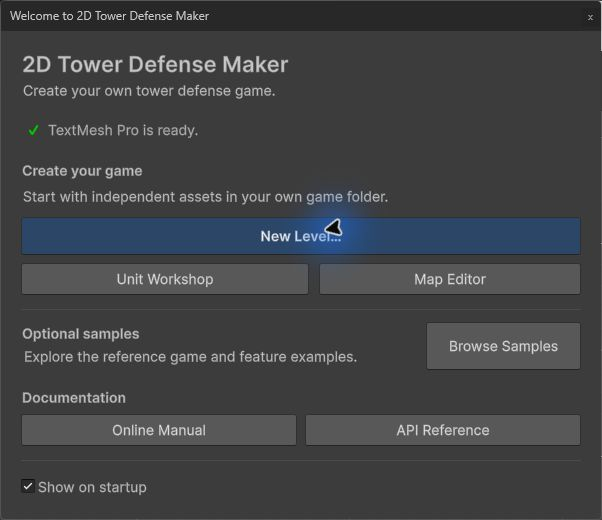
Start with your own content, then use the New Level wizard, Unit Workshop and Map Editor to author and validate it. The complete sample game is optional.
Requirements
| Item | Value |
|---|---|
| Unity | 6000.0 LTS or newer |
| Render pipeline | Universal Render Pipeline (2D renderer), URP 17.x |
| Packages | URP, 2D Sprite and uGUI 2.0 (includes TextMesh Pro). Import TMP Essential Resources once in the buyer project; they are not redistributed. Input System is optional. |
| Platform | Developed for PC (mouse and keyboard). The core has no platform dependencies. |
Folder layout
Assets/TDMaker/
  Runtime/Core/     TDMaker.Core   – pure C# simulation (no UnityEngine references)
  Runtime/Unity/    TDMaker.Unity  – authoring assets, scene components, runner, views, HUD
  Editor/           TDMaker.Editor – editor windows, inspectors, validator, dry run, sample generator
  Samples/Basic/    Ready-to-play sample scene and its data assets
  Samples/Crossroads/ Second level: three merging entrances, a flying route, two heroes
  Samples/WindingPass/ Third level: one long road, armored and magic-resistant waves, mortar branches, a boss
  Samples/Demo/     Playable demo flow (title, save slots, world map of the sample campaign, pause and result screens)
  Samples/Extending/ Compiled extension examples (custom system, data, selector, damage hook, action, command)
  Documentation/    Online documentation links and third-party notices
Namespaces: TDMaker.Core.*, TDMaker.Unity.*, TDMaker.Editor.*. Global menus live under Tools > 2D Tower Defense Maker, asset creation under Assets > Create > 2D Tower Defense Maker.
Where to start
- Quick Start – build your own level or explore the optional samples (or the whole demo:
Samples/Demo/DemoSample.unity), then build a first level with the New Level wizard in about 5 minutes (and see how it is made by hand). - Concepts – how the simulation works (ticks, ranges, targeting, damage, economy).
- Authoring Reference – every asset and scene component, field by field.
- Editor Tools – path editor, Unit Workshop, Wave Timeline, Upgrade Tree, Validator, Dry Run.
- Mechanic Library – the built-in mechanic library (chains, multi-target, knockback, pulses, healing, shields, combat modifiers).
- Presentation – HUD, themes, typography, languages, VFX/audio hooks, camera and settings. Campaigns, Progress and Saves – campaign asset and world map, level progress and stars, save slots and the permanent upgrade shop.
- Extending the Framework – adding your own systems, data, targeting, damage rules, abilities and commands.
- Determinism and Replay, Performance, FAQ, Changelog.
- Support and licenses – troubleshooting information, third-party notices and included font licenses.