Requirements
Use Unity 6. The package declares 6000.0 as its minimum editor version; the development reference is 6000.3.2f1. Read release notes and select the Unity version and render pipeline for your project.
The supplied presentation uses uGUI, TextMesh Pro, Input System, sprites and an orthographic camera. The manifest declares uGUI 2.0.0 and Input System 1.17.0. Import TMP Essential Resources when requested. Select Input System or Both in Active Input Handling.
The simulation libraries are engine-independent. The supplied UI/input targets keyboard and mouse. Connect custom devices, storage and art rigs through the adapter interfaces. Match materials and camera configuration to your project's render pipeline.
Entry point and reference fields
Entry point: Project Settings > Player > Active Input Handling
| Field / API | Purpose |
|---|---|
Unity |
Package target: 6000.0; development reference: 6000.3.2f1 |
uGUI |
2.0.0 in the manifest |
Input System |
1.17.0 in the manifest |
TMP |
Import Essential Resources into your project |
Figure
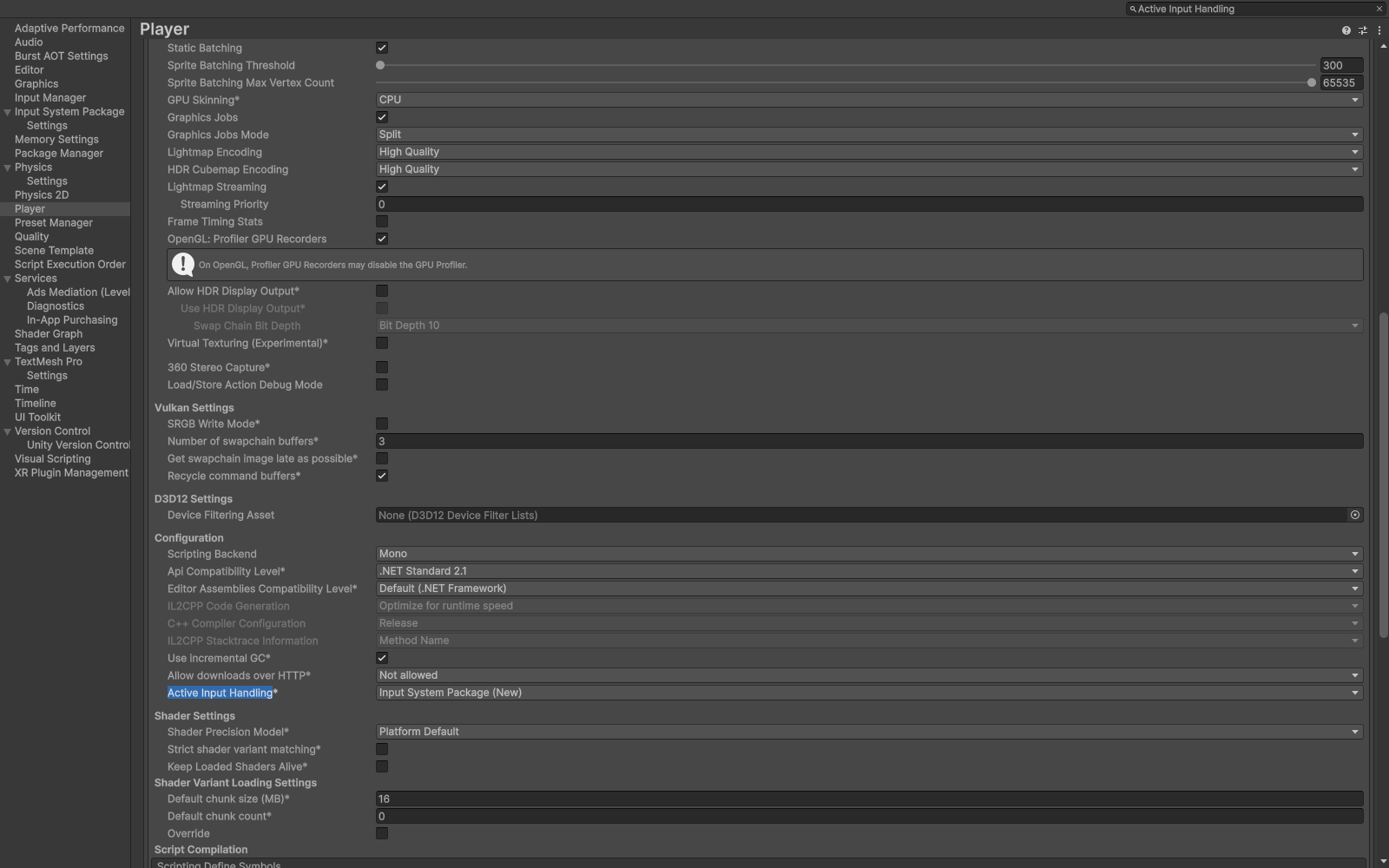
Player settings with Input System Package selected for Active Input Handling.
Check your result
Validate connected content before starting a new measurement or run. Keep the settings, seed and content version with any result you compare. For code-only adapters, compile against the package version you ship and configure the required authored data before gameplay.